


LINQ Connect
4.0543.00 Reviews
App Specs
- Version
- 390.6.19
- Updated On
- License
- Free
- Downloads
- 100,000+
- Developer
- EMS LINQ
- Categories
- Education
- Platform
- Android
Screenshots
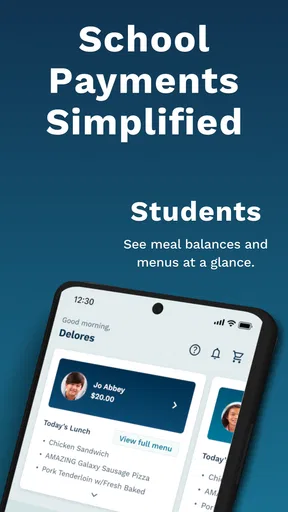
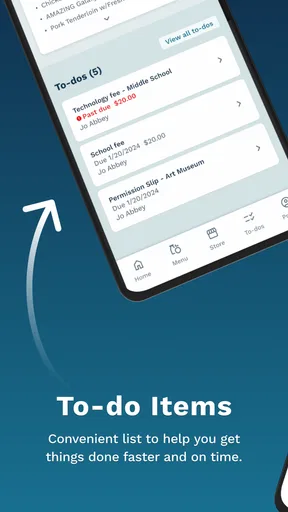
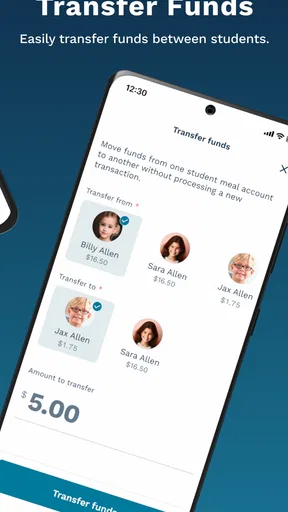
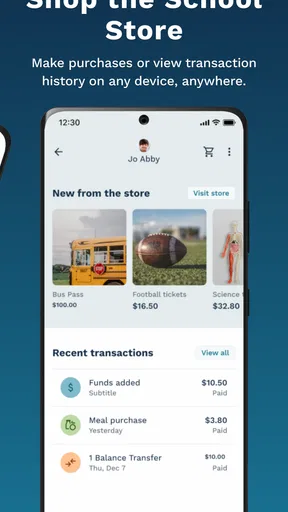
 Analysis by AppCompare
Paying school fees is rarely something I want to turn into a long administrative task. I usually need to check an amount, add money to a meal account, complete the payment, and move on with my day. LINQ Connect is built around that practical routine, bringing those school-related payments into one mobile app rather than making me search through emails, school websites, or paper notices.
Developed by EMS LINQ, this free Education app is aimed at families who use participating school services. Its central promise is simple: manage school fees and meal-account money from wherever I happen to be. That focus makes it very different from a general banking app. It is not trying to replace my bank, organize every part of school life, or become a broad learning platform. Its usefulness depends on whether my school supports the LINQ system, but when that connection is in place, the app can remove a surprisingly annoying piece of family administration.
I approached it as a parent-facing utility rather than an app I would open for entertainment. That distinction matters when judging speed and stability. I do not need elaborate screens or constant updates here; I need the app to get me to the relevant account quickly, show me what I need to know, and let me finish a payment without confusion. My overall impression is that the concept is strong for that narrow purpose, although the experience is naturally tied to school setup and the quality of the connection behind it.
How LINQ Connect feels during everyday use
I find LINQ Connect most useful when I treat it as a focused way to handle school payments, not as a place to manage every part of family or school life. That distinction also shapes how I think about trust: before moving money, I want to know which account I am acting on and what the app is asking me to confirm. The next section looks at the practical checks that help me stay deliberate.
Speed expectations for quick school payments
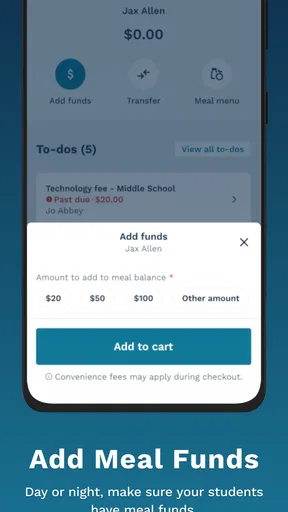
The first thing I value in an app like this is a short path from opening it to completing a task. LINQ Connect makes sense when I am handling a specific school need, such as adding funds to a child’s meal account before the next school day. I am not looking for a dashboard packed with unrelated information. A focused payment tool can feel faster simply because it asks me to make fewer decisions.
That does not mean every moment will feel instant. Payment apps depend on account information, school records, and network communication, so the app’s responsiveness is only part of the experience. A screen may appear quickly while the actual balance or transaction still needs to refresh. I treat that distinction seriously: seeing a page load is not the same as knowing that money has been applied successfully.
My practical advice is to avoid waiting until the last minute for an important meal-account top-up. If the school day is about to begin, a delayed connection or an account issue leaves little room to investigate. I prefer to make the payment earlier, keep the confirmation available, and check the account again only when necessary. That workflow is more dependable than repeatedly tapping the payment button in a hurry.
Worth Reading Before You Choose

EA SPORTS FC Mobile 26 Is a Bigger Football Game, but It Takes Time

Flipboard Shows What News Apps Must Do Beyond the Feed

Switching to Android Auto Means Rethinking Your Driving Routine

Google Calendar Makes a Crowded Week Easier to Manage

Ludo King Makes the Most of the Minutes Between Plans

Baby Panda World Brings Quick Play to Modern Phones, but Its Game Library Feels Busy
The app’s free price also lowers the barrier to trying it. I do not have to decide whether a subscription is worth paying for just to handle a school balance. Still, “free” does not make it a universal payment solution. The school has to be part of the relevant LINQ arrangement, and families should use the account connected to their school information rather than expecting the app to discover every school automatically.
What happens during heavier-use moments
The most demanding situations are likely to happen when many families are doing the same administrative job at once: preparing for a new term, responding to a school reminder, or adding meal funds before a busy morning. Those are the moments when a simple app can feel less predictable, not necessarily because its interface is complicated, but because account and payment services may be handling more requests.
I would not judge LINQ Connect only by how quickly an ordinary screen opens. The more important test is whether it helps me recover sensibly when something takes longer. If a payment appears to be processing, I would first check the account or transaction status before submitting another payment. Repeating the action immediately can create uncertainty about whether the first attempt worked. This is one of the less obvious habits that makes a difference with school-payment apps: slow feedback should lead to verification, not automatic repetition.
For families managing more than one child, the workload can also become more demanding even if each individual payment is straightforward. I would prepare the children’s details before starting, handle one account at a time, and review the recipient and amount before confirming. That small pause is useful because the main risk in a multi-account workflow is not only slowness; it is putting the correct amount into the wrong meal account.
Another realistic heavy-use scenario is a parent commuting to work who receives a message that funds are low. In that situation, the app is more convenient than finding a desktop computer, but convenience should not be confused with emergency access. I would use a stable connection when possible, avoid switching between several apps during confirmation, and save the transaction information until the school account reflects the change.
Reliability and recovering from a problem
Reliability here has two layers. The first is whether I can open and navigate the app consistently. The second, and more important one, is whether the school-related information and payment result remain trustworthy. A polished interface cannot compensate for uncertainty around a balance or a completed transaction, so I pay more attention to clear status information than to visual extras.
LINQ Connect has an average rating of 4.0 from around two thousand ratings, with over five hundred written reviews. That suggests a generally usable experience, while also reminding me that it will not be perfect for every family or every school setup. Ratings are useful as a broad signal, but they cannot tell me whether a particular problem comes from the app, a school account, a payment provider, or an outdated child record.
When something goes wrong, I would follow a calm recovery sequence. First, I would note the amount and the child account involved. Next, I would check whether the transaction is still pending or whether the balance has changed. I would avoid making a second payment until that status is clear. If the issue concerns the school’s records rather than the app screen, contacting the school is likely more productive than repeatedly reinstalling the application.
This is also where expectations matter. LINQ Connect is a payment and account-management tool, not a substitute for the school office. A school may still need to answer questions about meal eligibility, account ownership, or how a particular charge is recorded. I like the app most when I use it for the task it is designed to support and keep school-specific questions directed to the school itself.
Device constraints and practical compatibility
The current version is 390.6.19, and the app supports Android 7.0 or later. That gives it a relatively broad reach for families using older Android phones, although compatibility on paper does not guarantee an identical experience on every device. Older hardware may take longer to launch apps, handle account screens, or return from another application after a payment step.
I would be especially careful with a phone that has very little free storage, an aging battery, or aggressive background restrictions. Those are general device conditions that can make any account app appear unreliable. Before blaming LINQ Connect for a slow session, I would close unnecessary apps, use a dependable connection, and make sure the operating system is not interrupting the process. A restart can also be worthwhile if the app has been left open for a long time.
The Everyone content rating is appropriate for a family payment utility, but that does not mean every child should use it independently. School-fee and meal-account actions involve real household money and personal school information. I would keep the payment activity with the responsible adult, even if the app is installed on a shared family device.
iPhone users should also think in terms of practical support rather than assuming that the same experience will be identical across platforms. The important question is whether the version available for their device connects to their school’s LINQ service and supports the accounts they need. For Android users, the stated minimum of 7.0 is a useful starting point when checking an older phone before installing.
Where it beats the usual alternatives
The usual alternatives are often a school website, a general banking app, a phone call to the school office, or sending money through a child’s usual school process. A bank app may be excellent for moving money, but it usually does not understand the school account that should receive it. A school website may contain more information, yet it can be less convenient on a phone, particularly when I only need to add meal funds.
LINQ Connect’s advantage is specialization. It puts the school-payment task in a place I can return to without searching for the correct page each time. That is a meaningful improvement for parents who make recurring top-ups or manage school fees while away from home. The trade-off is that a specialized app is only valuable inside its supported school ecosystem. If my school does not use the relevant LINQ service, the app cannot become useful through personal preference alone.
I would choose the school website instead when I need broader administrative context, such as announcements, forms, calendars, or explanations of charges. I would use my banking app when I need to manage household finances generally. LINQ Connect is better for the narrow action of connecting that financial activity to a school-related account. Knowing which tool fits which job prevents disappointment and reduces duplicate work.
Small workflow choices that improve the experience
One useful habit is to treat each top-up as a recordkeeping event rather than a casual tap. Before confirming, I would check the child name, account destination, and amount. Afterward, I would keep the confirmation until the balance or transaction history reflects the change. This is particularly helpful when several children attend the same school or when a shared phone is used by more than one adult.
A second tip is to separate routine funding from urgent funding. If I know that meal money is used regularly, I would establish a personal reminder to review the account before it becomes critical. The app can make the payment convenient, but it cannot prevent me from forgetting. Planning ahead also gives me time to resolve a mismatched account or a delayed update without affecting the next school day.
A third trade-off concerns access. Having the app on my phone is convenient when I am traveling, at work, or away from a computer, but convenience also means I may be tempted to approve a payment while distracted. I would not complete a school payment while rushing between tasks if I cannot carefully verify the details. The few seconds spent reviewing the screen are more valuable than saving a few taps.
Finally, I would keep the app updated when my device offers a normal update path, while remembering that a newer app version cannot fix every account-side issue. If a problem appears only for one child or one school account, that pattern is a clue that the issue may be connected to the record rather than the phone itself. That observation can make a conversation with school support much more useful.
Who should use it, and who should skip it?
I recommend LINQ Connect to parents and guardians whose schools use the service and who regularly need to pay fees or add meal-account funds. It is especially suitable for people who want a phone-based option instead of logging into a school portal from a computer. The free price and Everyone rating make it easy to consider for a household, while the broad Android support helps people who do not own a recent phone.
I would be more cautious if I rarely handle school payments, if my school already provides a smoother dedicated portal, or if I need a complete school-management platform rather than a focused payment tool. It is also not the right choice for someone expecting a general budgeting application, a learning app, or a universal way to pay any school in any district.
The app has passed one hundred thousand installs, which shows that it serves a substantial audience, but popularity does not remove the need to verify school compatibility. My first step would be to check whether the school has directed families to LINQ Connect and whether the account details match the child I need to manage. That check is more important than the install count because the app’s value comes from the connection to the school’s system.
My performance verdict
After looking at LINQ Connect as a real-world utility, I see its strongest quality as focused convenience. It gives school-related payments a dedicated home, which is more practical than forcing parents to navigate a general banking tool or repeatedly hunt through a school website. The experience should feel light when the account is correctly connected and the network is behaving normally.
Its performance should be judged with realistic expectations. I would not rely on it as a last-second rescue tool, and I would not submit a second payment simply because the first confirmation takes time. The best results come from using it early, checking the destination carefully, and allowing account information to catch up before deciding that something failed.
For me, the main limitation is not the idea but the dependency on school participation and account accuracy. Families outside that ecosystem have little reason to install it, while families inside it may find the app genuinely useful for recurring payments. It does not replace every school communication channel, but it can remove a specific source of friction from everyday family life.
My final recommendation is straightforward: if your school supports EMS LINQ and you need a convenient way to handle fees or meal funds from a phone, LINQ Connect is worth trying. I would keep the school website and bank app available for their separate jobs, use this app for the school-account task itself, and build in a little time for verification. With that approach, it is a sensible free Education app rather than an overcomplicated addition to the phone.
Pros
- Conveniently manages multiple LINQ utility accounts in one app.
- Usage details help customers monitor water and energy consumption.
- Paperless billing reduces clutter and keeps statements easy to access.
- Payment confirmations provide useful records after transactions.
- Service information and contact options are available from one place.
Cons
- Some features may depend on your local LINQ service availability.
- Account setup can require accurate billing and customer information.
- The interface may feel basic compared with newer utility apps.
- Payment processing may include fees depending on the selected method.
- Occasional login or loading issues can interrupt access to account details.
FAQs for LINQ Connect
What is LINQ Connect, and what can I use it for?
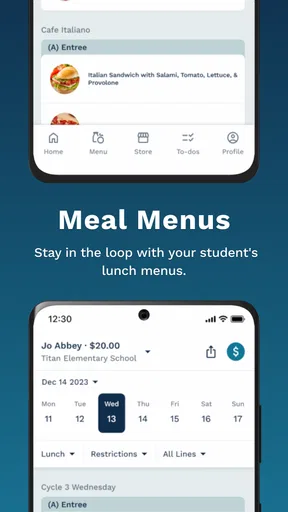
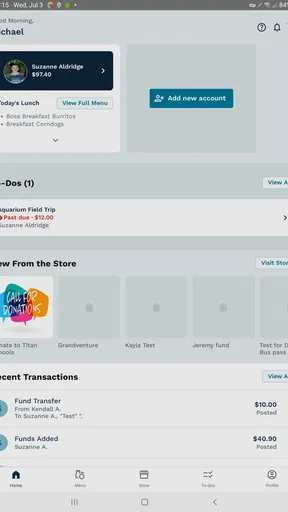
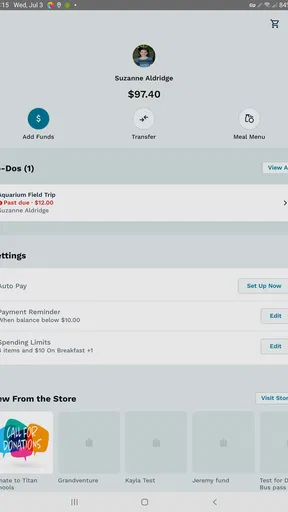
LINQ Connect is a digital platform used by participating schools and districts to help families manage school-related services in one place. Depending on your district, it may let you view cafeteria menus, add money to a student meal account, review purchases, manage balances, access forms, or receive school communications. The exact tools available can vary, so your school or district determines which features appear in the app.
How do I create an account or connect my child to LINQ Connect?
After installing LINQ Connect, you generally create an account with an email address and password, then select or search for your participating school district. To connect a student, you may need information such as the student’s name, identification number, school, or another detail supplied by the district. If the student cannot be found, check the information carefully and contact the school nutrition office or district support team.
Can I add money to my child’s school meal account through LINQ Connect?
In supported districts, LINQ Connect allows parents and guardians to make online payments toward a student’s cafeteria or meal account. Available payment methods, minimum amounts, processing fees, automatic replenishment, and payment limits may differ by district. Before confirming a transaction, review the total cost and any service charge shown on the payment screen, since fees may not be refundable.
Is LINQ Connect safe for managing student information and payments?
LINQ Connect is designed to provide account access and payment services through a secure online connection, but users should still follow normal security practices. Use a strong, unique password, avoid signing in on shared devices, and enable available account protections. Student records and payment details may be handled according to the district’s policies and the platform’s privacy terms, so review both before using the service.
What should I do if LINQ Connect is not working or a payment is missing?
If the app does not load, update it from the official Android or iOS store, check your internet connection, and try signing out and back in. For a missing payment, first review the transaction history and confirm that the correct student account was selected. Do not submit repeated payments immediately. If the issue continues, save the receipt or confirmation number and contact LINQ Connect support or your school district.


